

TM 5-3805-293-23-1
0005
USING THE MESSENGER CONTINUED
005
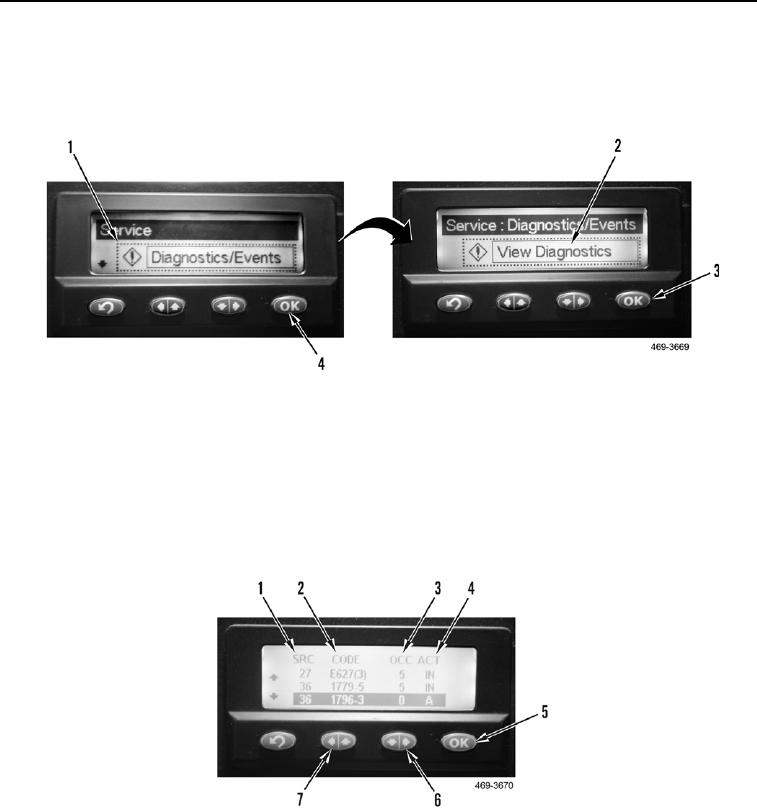
The Diagnostics/Events sub-menu (Figure 4, Item 1) will display, select the OK button (Figure 4, Item 4).
The View Diagnostics sub-menu (Figure 4, Item 2) will display, select the OK button (Figure 4, Item 3) to view all
diagnostic and event codes.
Figure 4. Messenger Module Diagnostic Code Selection.
0005
On the view Diagnostics list display, the SRC column (Figure 5, Item 1) shows the module identification (MID)
code, which is the module reporting the diagnostic code. The CODE column (Figure 5, Item 2) displays the
diagnostic code and is the component identifier (CID) and failure mode identifier (FMI). The OCC column (Figure 5,
Item 3) is the occurrence and indicates the number of times the code has set. The ACT column (Figure 5, Item 4)
will display the letter "A" if the code is active, or IN if the code is not currently active. Use the left/up button (Figure
5, Item 7), or the right/down button (Figure 5, Item 6) to scroll through the list of diagnostic codes. Press and
release the OK button (Figure 5, Item 5) to view the diagnostic code detail for each diagnostic or event code.
Figure 5. Messenger Module Diagnostic Code Display.
0005